
Public API Integration Guide
Programmatically validate plates, and access Offstreet data
The Offstreet Public API allows your system to connect with Offstreet in real time validate licence plates, and access location or event data. The API is REST-based, well-documented, and easy to work with.
View the full documentation here: https://developers.offstreet.io/
Overview
With Offstreet’s Public API, you can:
- Validate licence plates during enforcement
- Retrieve Offstreet locations and event data
- Seamlessly integrate Offstreet with other systems (e.g., CRMs, kiosks, gate access tools)
What You’ll Need
Step-by-Step Setup
1. Generate an API key
To generate an API key you must have Admin security access for your company:
- Navigate to dashboard.offstreet.io/ and open the Company tab
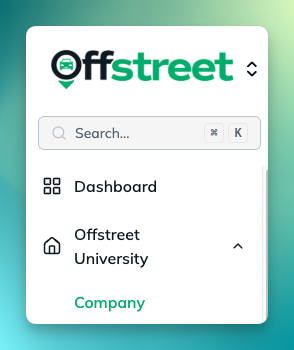
- Scroll down to find the API Keys section and select Create API Key +

- Give the key a name and configuration
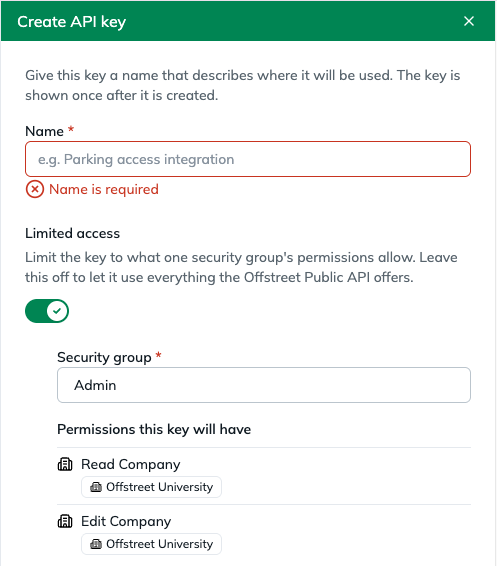 Public API key security has 3 different access levels; Company data (Permits, Locations, etc.), Customer data (CRM data in the Customers tab), or both.To give an API key access to both Company and Customer data, leave the toggle offTo limit access, create a security group with either Read/Edit Company or View Customers, toggle on Limited access and add the security group
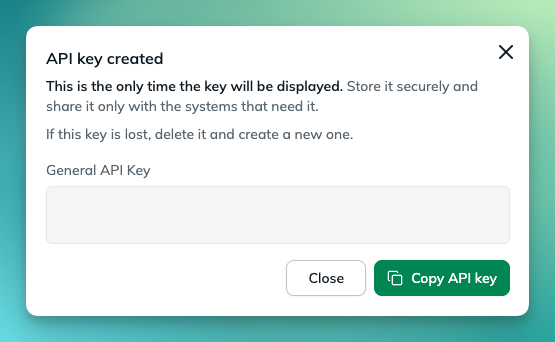
 - Copy and save the generated API key. ONCE THE WINDOW IS CLOSED THE API KEY CAN NOT BE ACCESS AGAIN
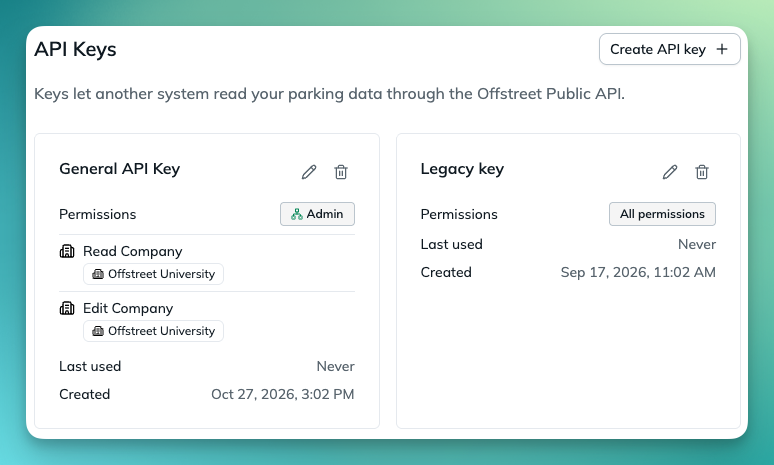
Once generated API keys can be managed from Company tab
Reach out to your Offstreet account manager or company Admin to request:
- Your API Key (Bearer token)
- The Base URL for your environment (sandbox or production)
2. Review Available Endpoints
Key endpoints include:
Each endpoint includes full documentation with required fields, sample payloads, and response examples.
3. Authenticate API Requests
All requests must include your Bearer token in the header.
4. Test and Integrate
You can test the API directly in SwaggerHub using the "Try it out" feature.
Once your integration is ready, you can:
- Create permits from a CRM, kiosk, gate, or other source
- Validate licence plates in real-time enforcement workflows
- Sync Offstreet data to other systems
The Offstreet Public API lets approved partners securely access live parking data from the Offstreet platform. It’s designed for integrations so partners can view parking sessions, permits, and locations in real time, without manual data sharing.
What’s Available
How It Fits Together
- Permit → Sessions: Each permit can include multiple sessions (e.g., if it covers more than one vehicle or site).
- Session → Vehicle: Each session is one car, one time, one location.
- Plate & Location: Primary lookup paths — e.g., “show me everything for plate ABC123” or “everything at Downtown Garage.”
Secure & Simple
- Access requires an API key provided by Offstreet.
- All data is read-only — partners can view, not edit.
- Partners only see data for their authorized company and locations.
- Data is updated in real time and delivered securely over HTTPS.
Quick Reference: Common Questions Answered
What’s Not Shared via the Public API
Need Help?
Reach out to your Offstreet Account Manager or reach out to the Offstreet support team using the Support form here: Client Support if you:
- Need help setting up your credentials or environment
- Have questions about how to use a specific endpoint
- Encounter issues during testing or implementation
Was this article helpful?
That’s Great!
Thank you for your feedback
Sorry! We couldn't be helpful
Thank you for your feedback
Feedback sent
We appreciate your effort and will try to fix the article