Registration Codes for Events
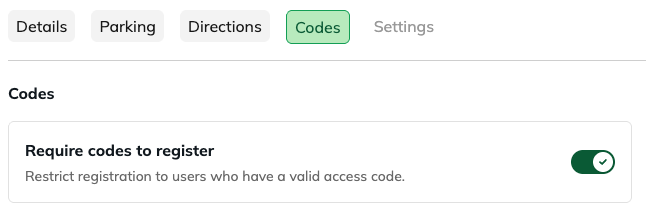
Restrict registration to users who have a valid access code.
Registration Codes for Events give you control over who can register for your event and how often those codes can be used. Whether you’re running an invite-only event or managing capacity, codes help ensure only the right people gain access!
Why This Matters
Registration Codes for Events used to be pretty simple:
- One shared code for everyone, or
- A single list of unique codes
No limits, no tracking. Now, you’ve got a lot more control, including usage limits, resets, and per-code customization!
How it works
To enable Registration Codes for Events, head to the Codes tab and toggle Require codes to register.
Add Codes
- Add Code → create a single code
- Add Multiple → paste in a list
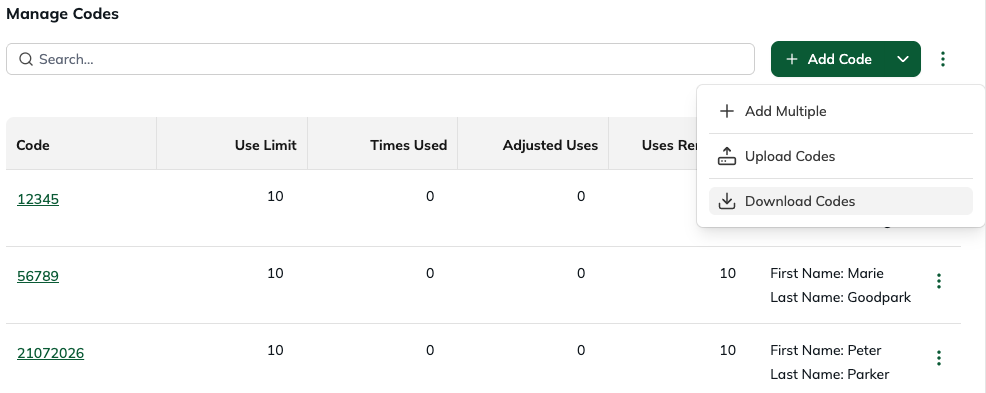
- Upload Codes → import in bulk
Once a code is created it will function almost the same way as the old Event Codes. To unlock the full power of the new Registration Codes for Events, toggle Advanced. This gives you access to:
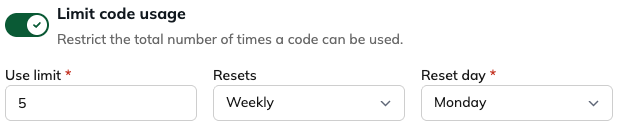
Set Usage Limits
Control how many times a code can be used, and optionally have it reset (like weekly or monthly).
Override a Code's Limit
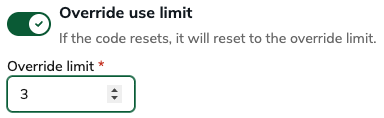
Need one code to behave differently? Turn on Override use limit and set a custom limit just for that code. When it resets, it’ll follow this new limit instead of the default.
Adjust Uses on the fly
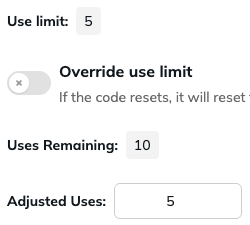
You can also add more uses to a code using Adjusted Uses:
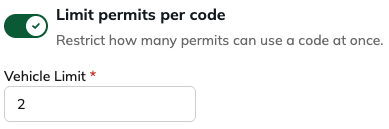
Limit Permits Per Code
Set how many vehicles can use the same code at the same time.
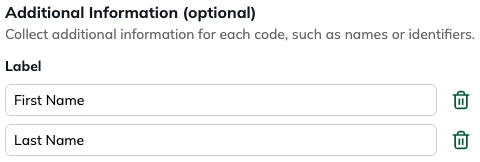
Add Additional Information to a code
Want to know who a code belongs to or what it might be used for? Add custom fields like name or ID when to keep track.
Managing Codes
From the table, you can quickly:
- See usage and remaining uses
- Edit or remove codes
- Download your list
FAQs
What happens when a code reaches its limit?
Once the limit is reached, the code can’t be used again, unless it resets or you adjust it.
When should I use override vs adjusted uses?
- Use Override when you want a permanent different limit for a code
- Use Adjusted Uses when you want to temporarily add uses without changing the base limit
Can I collect additional info when someone enters a code?
Not at this time. Additional information for codes are added to the code prior to it being used.
What happens if I change a code’s limit after it’s already been used?
The new limit applies moving forward. Existing usage stays as-is, but it may affect how many uses remain.
Was this article helpful?
That’s Great!
Thank you for your feedback
Sorry! We couldn't be helpful
Thank you for your feedback
Feedback sent
We appreciate your effort and will try to fix the article